0 Definition
Since June, “loop engineering” has gradually become a hot term in the agent space. The earliest systematic blog I found on this idea is Loop Engineering by Addy Osmani. He says, roughly: “Loop engineering means designing systems that prompt agents on your behalf, rather than you issuing every instruction yourself. In this context, a loop can be understood as a recursive goal: you define a goal, and AI iterates until it is completed.” This feels somewhat similar to Claude Code’s /goal mode. I used to want to distinguish goal and loop, but after reading Anthropic’s blog, I think there is no need to separate them too much. In essence, they are all loops.
What is the relationship between loop engineering and what people previously called harness engineering? Personally, I do not feel there is a big difference at the level of the idea. An agent workflow built with a harness is, in essence, already satisfying the loop idea. If we really want to distinguish them carefully, one classification I saw online puts it this way (Chapter 12: Loop Engineering — From Prompting Agents to Designing Loops — AI-era Software Engineering):
Loop Engineering (who prompts the agent)
  |
  `-- Harness Engineering (the agent's runtime environment)
        |
        `-- Methodology layer (how the agent works)
              |   Skills / SDD / Ralph Loop / gstack / Goal Workflow / autoresearch
              |
              `-- Project layer (what to build)
                    goscapy / web apps / microservices...
In Osmani’s words: a harness lets one agent run safely, while a loop lets a group of agents run by themselves.
A more careful distinction is that harness is more about a single agent’s runtime environment, while loop is more about triggers, dispatch, verification, state, and continuous execution at the system level. But based on my own usage, many agent workflows built with harnesses already satisfy the loop idea, so I do not think it is worth over-focusing on the terminology boundary.
The Claude Code team’s definition of loop is more engineering-oriented: an agent repeatedly executes work cycles until a stop condition is met. Repetition is easy for agents. The hard part is deciding when to stop. In traditional automation, loops are usually controlled by explicit program conditions, such as an empty queue, passing tests, or a timer. In agent scenarios, if the stop condition is only “the model feels it is good enough,” subjective judgment enters the system. Claude Code’s emphasis on /goal, verification skills, code review, and token boundaries is essentially about turning stop conditions from fuzzy model feelings into checkable engineering facts. Not every task needs a complex loop. Simple tasks can be completed with simple interaction. Complex loops should solve concrete problems such as “one turn is not enough,” “the human is the bottleneck,” or “the task has a verifiable boundary,” instead of making things agentic just for the sake of it.
1 Components of a Loop
The literal meaning of loop is a cycle. My personal understanding is that a loop has two basic elements: generation (workflow) & verification. In a real task, when designing a loop, the first thing is to understand the business logic of the scenario and build the workflow. That is, you turn the previous human work process into an agent execution process. In addition, the most important part is the verification gate, which is the standard for judging whether the work is complete. This verification process is similar to the observation in ReAct that agents have always emphasized. Observing the surrounding environment further evolves into checking whether the verifier’s return value satisfies the requirement, and then continuing with reasoning -> action.
One supplement: if this is a long-running loop, it also needs explicit state / memory. It needs to record what has already been handled, what the next step is, and where failures happened. Otherwise, the loop can easily process the same feedback repeatedly, or lose progress after session resume or context compaction.
Osmani gives the following components of a loop:
- Automations
- Worktrees
- Skills
- Plugins and connectors
- Sub-agents
- State / memory
These parts all have corresponding implementations in Codex or Claude Code:
- For example, Claude Code implements this through scheduling and hooks. You can use
/loopto run prompts or commands on a timer, schedule cron tasks, use hooks to execute shell commands at specific points in the agent lifecycle, or push the whole process to GitHub Actions if you want it to keep running after you close your laptop. - Worktrees are straightforward: different agents working on the same repo need isolation from each other.
- About skills, Osmani says in the article: the skill is the authoring format and a plugin is how you ship it. When you want to share a skill across repos or bundle a few together you package them as a plugin. In other words, multiple skills can be packaged as a plugin and published, making them easier to use across repos and scenarios.
- Plugins and connectors exist so loops can execute better. For example, when editing a project on GitHub, you may need to create issues or PRs, which means using the GitHub API or MCP.
- Sub-agents are now widely used. Usually, people build sub-agents around an explore -> implement -> verify structure.
- The underlying mechanism of Claude Code’s
/goalcommand is that a new model judges whether the loop should end, instead of letting the same model that did the work decide. This separation between creator and checker is also applied to the stop condition itself. You can even use Codex inside Claude Code: https://github.com/openai/codex-plugin-cc
- The underlying mechanism of Claude Code’s
One boundary to keep in mind: the /goal evaluator does not independently run commands or read files. It can only judge based on evidence that already appears in the conversation. So the goal is best written in a form that can be proven from the transcript, such as a test command exiting 0, a queue being empty, or a checklist item being done.
2 Types of Loops
To avoid mixing different loop types together, this table gives a quick comparison:
| Type | Trigger | Stop condition | Good for | Main risk |
|---|---|---|---|---|
| Turn-based loop | A user sends one prompt | The agent returns a final answer, or the user stops it | Daily Q&A, code changes, one-off debugging | Verification depends on user memory |
| Goal-based loop | The previous turn finishes and the session continues automatically | An evaluator judges the goal achieved, or a turn/time cap is reached | Multi-turn tasks with clear acceptance criteria | An unmeasurable goal can spin |
| Time-based loop | A time interval or scheduled task | The user stops it, the task expires, or the agent decides there is nothing left to do | Polling CI, PRs, deployment status | Over-polling wastes tokens |
| Proactive loop | An event, schedule, API, or external system triggers work | Each task’s goal is complete, the routine is disabled, or governance blocks it | Issue triage, dependency upgrades, alert handling | Permissions, cost, and quality governance become complex |
(1) Turn-Based Loops
The user sends a prompt. Claude reads context, takes actions, checks results, repeats when necessary, and then returns what it believes is the completed result. This loop is manually triggered by the user, and Claude also decides when to end or when it needs more context. Claude reads code, edits code, runs tests, then hands the result back to the user. The user checks it and decides the next step. The risk here is that verification often depends on manual user intervention. If the user has to remind it every time to “open the browser,” “check the console,” or “compare screenshots,” then even though the loop involves an agent, the quality gate still lives outside the system, in the user’s memory.
The improvement is also simple: write the manual verification steps into SKILL.md. A skill is not for making the prompt longer, but for turning the team’s “definition of done” and “checking actions” into reusable programmatic habits. For example, a UI change cannot be considered done just because the edit succeeded. It should start the service, verify interactions, take screenshots, check the console, and run a performance audit when needed. This keeps the turn-based loop simple, while making its quality boundary clearer.
(2) Goal-Based Loop
A goal-based loop uses /goal to extend the agent’s iteration time. It fits tasks that cannot be finished in one turn but have a clearly verifiable completion standard. The stop condition is that the goal is achieved, or that the maximum number of turns set by the user is reached. The value of this loop is that the user no longer has to manually decide after every turn whether to continue or stop. The system constrains the agent with the goal condition. An evaluator model checks the condition. If it is not satisfied, Claude is sent back to continue working until the goal is met or the turn limit is reached.
The key design point here is that the goal must be measurable. For example, “raise the Lighthouse score above 90, try at most 5 times” is more suitable for /goal than “optimize the homepage.” The former has a quantitative metric, a clear stop point, and a cost limit. The latter lets the agent wander in an open-ended space of “it could still be better.”
For engineering teams, /goal is most suitable for three types of tasks:
- Tasks with automated tests, scores, or static checks.
- Fixes with clear acceptance criteria but requiring multiple attempts.
- Optimization work that can tolerate bounded exploration but not unlimited consumption.
(3) Time-Based Loop
A time-based loop uses /loop or /schedule to solve the problem of tasks that repeatedly occur. Its trigger condition is not the user’s current prompt, but a time interval or scheduled task. Typical examples from the article include summarizing Slack messages every day, or periodically checking whether a PR has received review, whether CI failed, and so on. These tasks share a common pattern: the workflow is the same, but the input changes over time; or the state of an external system changes, so the agent needs to check and respond periodically. The article also reminds us not to poll too frequently. Longer intervals or event-based triggers usually save tokens and better match real needs. If an external system changes only once per hour, checking it every 5 minutes is waste.
- There is an important boundary here:
/loopruns locally, and stops when the machine is shut down;/schedulemoves the loop to a cloud routine. This is not just a deployment location difference, but a change in responsibility model. Local loops are more like personal assistance, while cloud schedules are more like continuously running automation processes, so frequency, permissions, and failure handling need to be set more carefully.
The stop condition of cc’s loop is no tool calls:
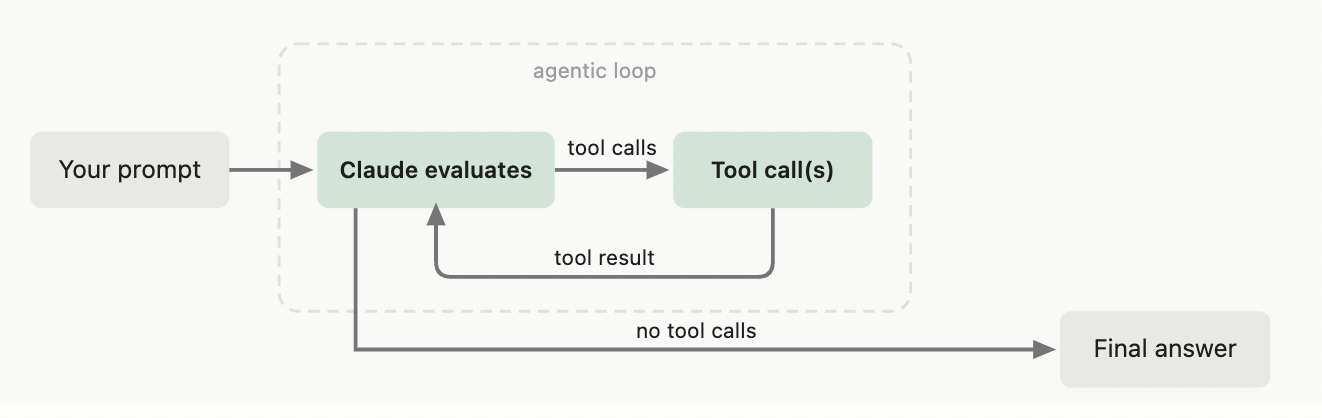
More accurately, “no tool calls” here refers to the Claude Code Agent SDK / turn-based inner loop: Claude evaluates, calls tools, receives tool results, and continues until one turn has no tool calls and returns the final answer. It is not the stop condition for /loop as a time-based scheduled task.
This mode is well suited for fixing known problems. For example, in the official cc example, “fix the failing tests in auth.ts”: the first few turns may use tools such as bash, read, and write, until the final turn is a text-only response. At that point, cc considers this loop complete.
(4) Proactive Loops
A proactive loop is the most complex form. It is triggered by events or schedules and does not need a human present in real time. Each task has its own goal, and the whole routine keeps running until it is closed. Suitable scenarios include bug reports, issue triage, migrations, dependency upgrades, and other work that keeps flowing in while having relatively stable structure. It can be a combination of multiple Claude Code primitives: /schedule periodically checks, /goal defines the completion standard, dynamic workflows orchestrate triage, fixing, review, and other steps across multiple agents, and auto mode lets the process avoid asking for human permission at every step.
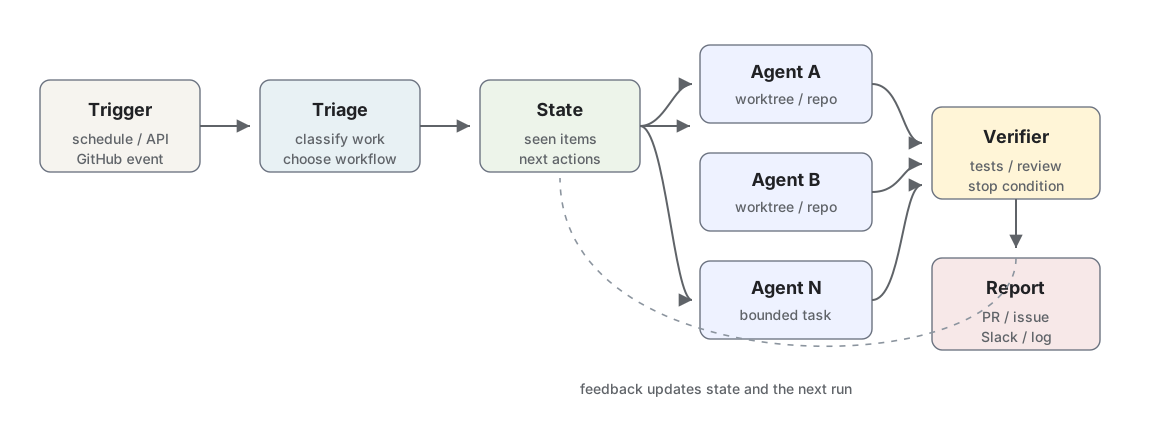
The key to this kind of system is not “higher automation,” but “harder governance.” Once there is no human intervening in real time, you must design these things in advance:
- Which actions are allowed to run automatically?
- Which judgments must use a stronger model or human intervention?
- How do you avoid processing the same feedback repeatedly?
- How do you review change quality?
- How do you limit tokens and the number of concurrent agents?
- How do you record state so the next run knows what has already happened?
The official cc recommendation is to use small models for routing and routine tasks, and the strongest model for judgment tasks. This reflects a practical principle: cost control for proactive loops is not only about running fewer times, but also about assigning judgments of different difficulty to models with different capabilities and prices.
3 Things to Watch When Using Loops
(1) The System Environment Is Important
By system environment, I mean the physical machine and directory where the agent runs + available tools and permissions + session context lifecycle + cross-session memory + skills/hooks, and so on.
The output quality of a loop is not determined by a single prompt, but by the whole system. Claude follows the existing patterns in the codebase, so the cleaner the codebase is, the easier it is for the agent to make consistent changes. The easier documentation is to access, the less the agent has to guess from outdated knowledge. The more specific the verification skill is, the better the agent can self-check. The more often an independent reviewer is used, the more it reduces bias from the main agent’s own reasoning path. The most important point is: when a result is not good enough, we should not only fix that one local problem. We should encode the lesson into the system. This is essentially saying that the object of improvement in an agent workflow is not “this answer,” but “the environment for the next loop.” If a class of errors appears repeatedly, it should become a skill, test, script, workflow, or review gate.
(2) Complex Loops Must Be Budget-Aware
CC breaks token management into several concrete actions:
- Choose the right primitive and model. Do not make small tasks carry the overhead of multi-agent or long loops.
- Define clear success and stop standards, so the agent neither stops too early nor continues forever.
- Run a small pilot before large-scale execution, especially because dynamic workflows may generate many agents.
- Based on my recent experience with dynamic workflows, this feature is not mature yet. In particular, cc often repeatedly generates agents, and sometimes some agents do not return results. This causes the workflow to get stuck on agents that have not returned, creating blockage.
- Use scripts for deterministic work, instead of making the model reason from scratch every time.
- Do not run a routine more frequently than the external world changes.
- Use
/usage,/goal,/workflows, and similar tools to inspect token consumption.
The most engineering-valuable point here is “script deterministic work.” If a task has fixed steps and clear input and output, such as PDF form filling, format conversion, or batch checks, it should be written as a script for the agent to call. The model is responsible for judgment and coordination, while scripts handle mechanical execution. This both reduces tokens and improves consistency.
(3) Stop Conditions Matter More Than Trigger Conditions
The trigger condition decides when the loop starts, while the stop condition decides whether risk is controllable. Most failures come from unclear stop conditions: the agent may deliver a half-finished result too early, or it may keep expanding scope in the name of “making it better.” Good stop conditions usually have three characteristics:
- Observable: test counts, scores, CI status, queue length, ticket status.
- Decidable: not “a bit better,” but “reaches X” or “does not contain Y.”
- Bounded: maximum turns, maximum time, maximum tokens, or maximum change scope.
If the stop condition is not observable, the evaluator can only guess. If the stop condition has no bound, a loop can easily turn one task into unlimited exploration.
4 Future
If a loop is built badly, and the loop is always AI review, AI fix, it will fall into a vicious cycle. This is not what we want. What we should really do is plan our own workflow before building the loop, and have the person who understands each phase best guard that phase. Only then can the final result possibly meet expectations. For engineers, we cannot only be the people who click one button to start a loop. We need to be people who understand the business logic and the overall workflow thoroughly.
In other words, loop engineering is not about letting agents think for us. It is about designing repeatable execution, checkable verification, and traceable state so that agents can work reliably in that system.
Credits
- Getting started with loops | Claude by Anthropic
- Loop Engineering | Addy Osmani
- How the agent loop works | Claude Code Docs
- Keep Claude working toward a goal | Claude Code Docs
- Run prompts on a schedule | Claude Code Docs
- Automate work with routines | Claude Code Docs
- Chapter 12: Loop Engineering | AI-era Software Engineering
- openai/codex-plugin-cc
Citation
Citation: When reposting or citing content from this article, please credit the original author and source.
Cited as:
Zachary WEI. (Jul 2026). Looping: From Prompting Agents to Designing Loops. https://zachary-ww.github.io/posts/looping/
Or
@article{zachary2026-looping,
  title   = "{Looping: From Prompting Agents to Designing Loops}",
  author  = "Zachary WEI",
  journal = "zachary-ww.github.io",
  year    = "2026",
  month   = "Jul",
  url     = "https://zachary-ww.github.io/posts/looping/"
}